Integration Flows
Call-flow diagrams for the basic integration of a new Customer with the Cloudike PAYG platform. In this guide, Customer means you — the company that launches Cloudike under its brand (see Definitions).
Pre-launch Integration
Before launch, the Customer and Cloudike agree on the following.
Technical endpoints
- SMS Gateway (SMPP or custom HTTP REST interface to send SMS from Cloudike PAYG) – see documentation
- REST API Interface to integrate with Cloudike PAYG – see documentation
Packages configuration
List of subscriptions available to users:
- ID
- Human-readable name
- Size (GBs)
- Cost
- Currency
- Period of renewal (hours, days, months, years)
- Who renews the package: Cloudike or the Customer's billing
- Renewal grace periods in days (paid and free), for packages renewed by Cloudike
Default package for new users (free or paid), if the Customer needs one. A tenant can have only one default package.
Documents
Terms of Servicedocument (public offer for user's agreement during sign-up)
Branding
- Name of apps
- Design and logo
Sign-in / Sign-up Flow
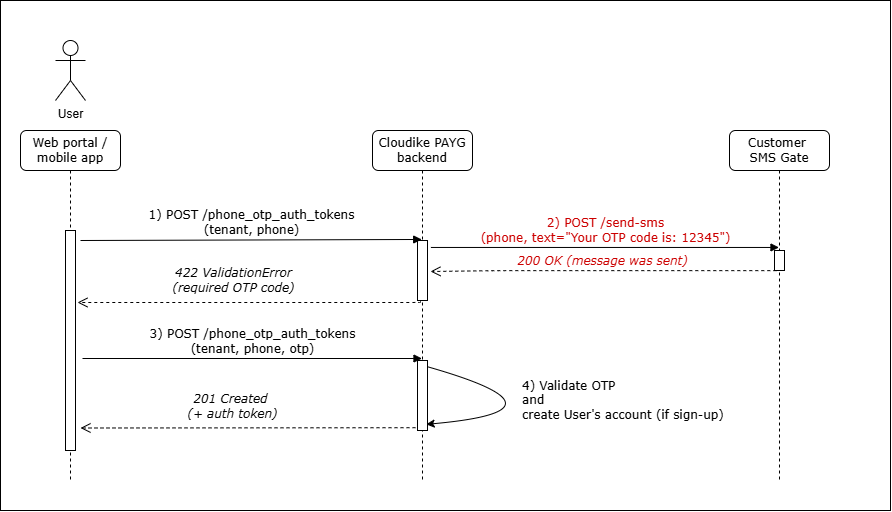
- The app asks the user for a phone number and acceptance of the Terms of Service, then calls the Cloudike PAYG backend method phone_otp_auth_tokens.
- The Cloudike PAYG backend generates a random OTP (One-Time Password) and sends it via Customer's SMS Gateway using:
- SMPP protocol or
- Special REST API method on Customer's side.
- The user enters the OTP code from the SMS in the app.
- The app validates the OTP on the backend.
- If OTP is correct:
- A new user account is created (if it's a sign-up).
- [OPTIONAL] If the tenant has a default package, the backend tries to activate it for the new user.
- Backend responds with a session key token.
Purchase Subscription – By User
This diagram shows how a user purchases (activates) a subscription in any Cloudike app:
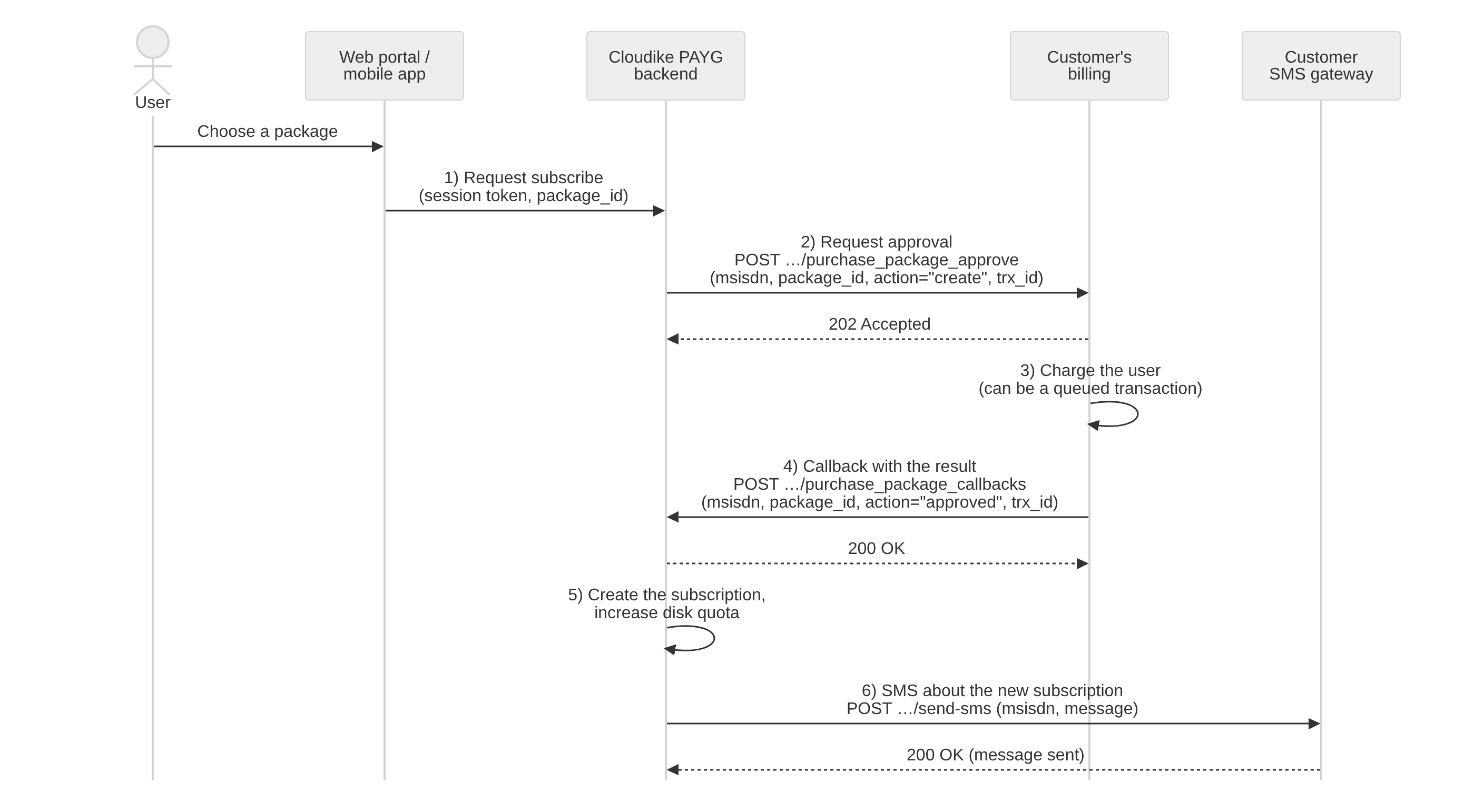
- The user selects a subscription in the app, and the app asks the Cloudike PAYG backend to purchase it.
- The Cloudike PAYG backend:
- Generates a transaction ID
trx_id - Requests approval to purchase from Customer's billing (see docs).
- Generates a transaction ID
- The Customer's billing charges the user (identified by
msisdnoremail).- If successful: responds
200 OKwith{"action": "approved"} - If declined: responds
200 OKwith{"action": "declined"} - If deferred: responds
202 Acceptedand queues the request
- If successful: responds
- The Customer's billing completes the deferred charge and informs the Cloudike PAYG backend using the same
trx_id. (See API method description) - The Cloudike PAYG backend:
- Creates the subscription
- Updates disk quota
- The Cloudike PAYG backend sends the user an SMS about the new subscription.
Renewal of Active Subscription – By Cloudike PAYG
This diagram shows how an active subscription is renewed when the package is renewed by Cloudike. For packages renewed by the Customer's billing, Cloudike doesn't request approval and there is no grace period: the subscription stays active until the Customer unsubscribes the user.
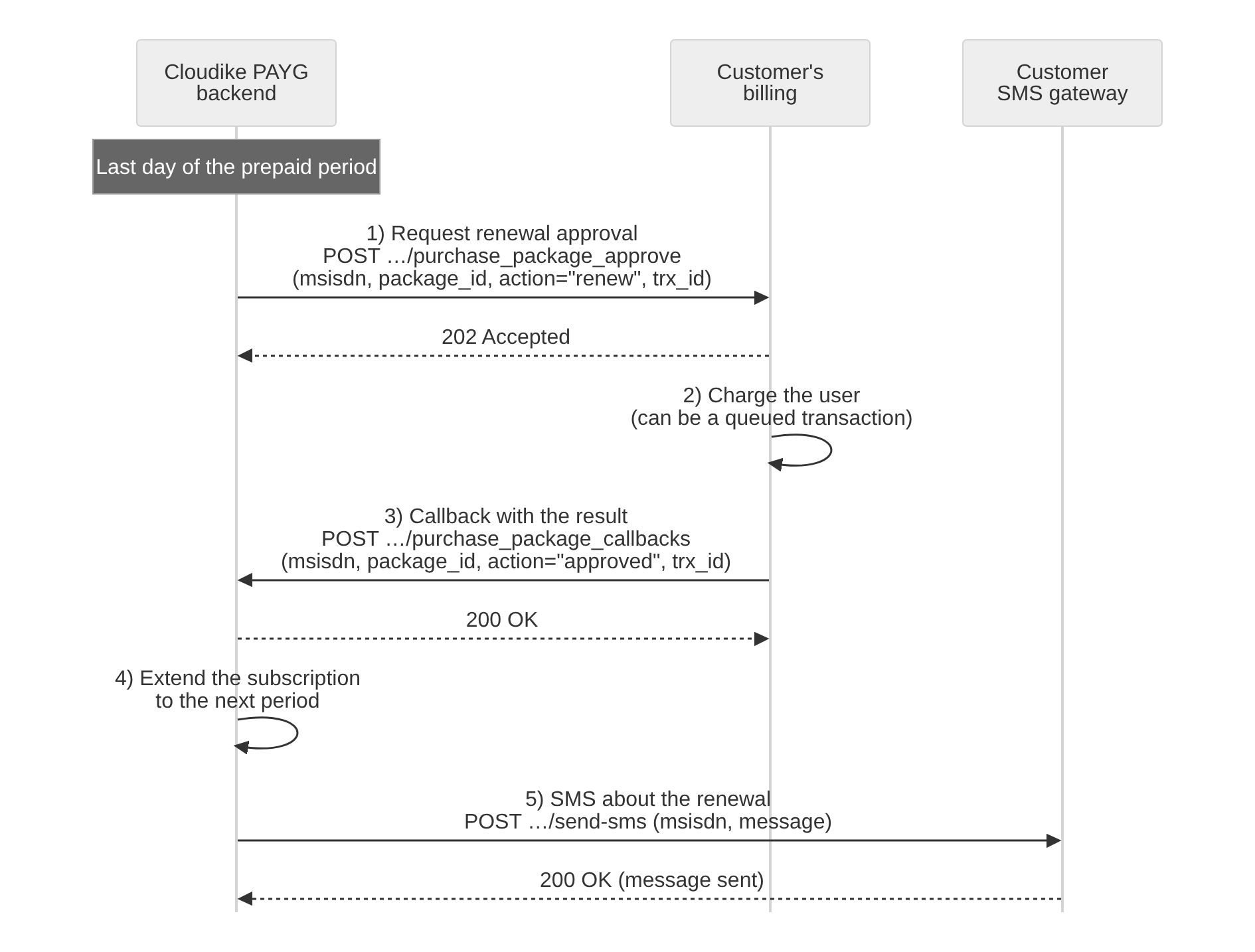
When the paid period ends, the Cloudike PAYG backend asks the Customer's billing to approve the renewal. If the renewal is not approved, the subscription stays active and enters a renewal grace period: first the paid grace period, if the package has one, then the free grace period (2 days by default). During the renewal grace period, the backend retries the renewal about every 8 hours. If both grace periods end without approval, the subscription is canceled. See Subscription Renewal.
Step-by-step flow
-
The Cloudike PAYG backend generates a transaction ID
trx_idand requests approval to charge the subscription cost from Customer's billing.
The related API method is documented. -
The Customer's billing responds:
200 OKwith{"action": "approved"}: Charge approved200 OKwith{"action": "declined"}: Charge declined202 Accepted: Charge deferred; request is queued for later processing
-
The Customer's billing performs the deferred charge from the user.
-
The Customer's billing notifies the Cloudike PAYG backend about the result of the deferred charge, using the same
trx_idas in Step 1. (See API method description) -
The Cloudike PAYG backend:
- Extends the subscription to the next period
- Schedules the next renewal
- Sends an SMS notification to the user's MSISDN confirming successful renewal
Cancellation of Subscription – By User
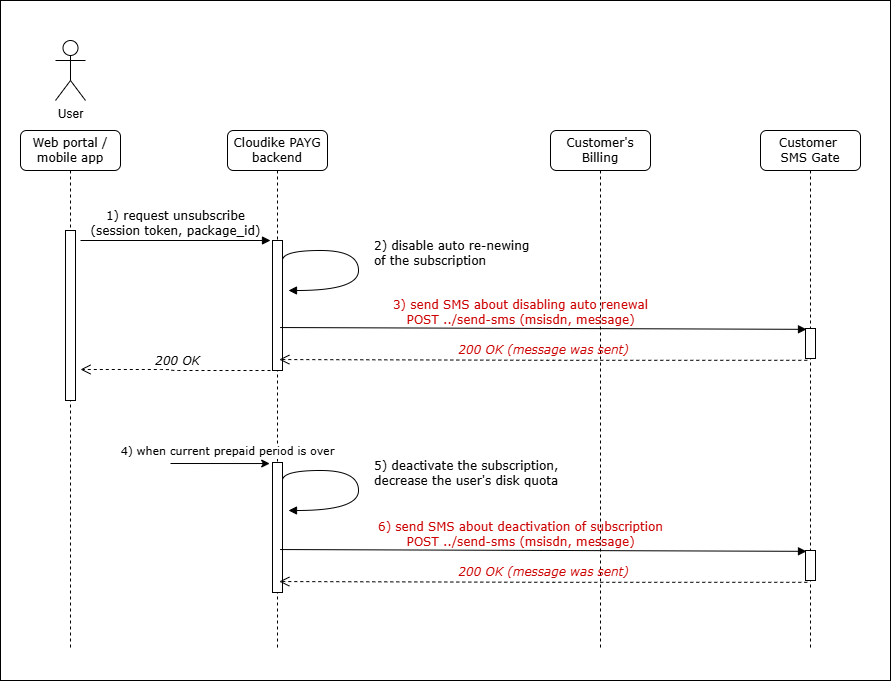
Cancellation of the user's active subscription occurs by a request from the client application to the Cloudike PAYG backend.
This action does not involve the Customer's billing system — it simply disables the auto-renewal process on Cloudike's side.
The subscription remains active until the end of the current prepaid period.
When the current prepaid period ends, the subscription is automatically unsubscribed.
Cancellation flow
- The user requests unsubscription in the app.
- The Cloudike PAYG backend disables the auto-renewal flag for the user's subscription.
- The backend sends the user an SMS saying that:
- Auto-renew has been disabled
- The subscription will remain active until a specific expiration date
- When the expiration date is reached:
- The backend runs the automatic unsubscription procedure
- Subscription is deactivated
- User's disk quota is reduced accordingly
- The backend sends the user an SMS confirming the cancellation.